
Sales Intelligence Platform: What to Look For

A sales intelligence platform helps teams understand who they are selling to before the first conversation. Instead of relying on scattered spreadsheets, aging CRM records, and guesswork, sales professionals can research prospects, verify contact details, and add useful context to the accounts they already track.

Choosing the right platform takes more than comparing feature lists. The best fit depends on the quality and reach of the underlying data, how your team accesses it, and how well it supports the research you do every day. This guide walks through the factors that matter most so you can evaluate options with confidence. You can also create a free account to follow along as you read.

What a Sales Intelligence Platform Does

At its core, a sales intelligence platform gathers and organizes information about people and businesses so sales teams can research, verify, and prioritize opportunities. Common uses include:

  • Prospect research: Learning more about the people and companies you plan to contact.
  • Contact verification: Confirming that names, addresses, and other contact details are current before outreach.
  • Data enrichment: Filling gaps in existing CRM records with additional details.
  • Account context: Cross-referencing business, asset, and court record data to better understand an organization.


When these tasks happen in one place, reps spend less time hunting for information and more time having relevant conversations.

Sales intelligence platform what to look for blog

Start With Data Coverage and Quality

Every insight a platform delivers depends on the data behind it. Before evaluating dashboards or workflows, look closely at where the information comes from and how it is maintained.

Questions worth asking

  • How many sources feed the platform? Broader sourcing improves your ability to cross-reference and confirm details.
  • How current is the data? Real-time access helps reduce the risk of acting on outdated records.
  • What data types are included? Identity, people, business, asset, and court record data each answer different research questions.


EnformionGO, for example, draws on more than 6,000 unique data sources for public-record inquiries and for cross-referencing the data your team already has.

Choose How Your Team Accesses the Data

Sales teams rarely work the same way, so flexible access matters. Most platforms offer one or both of the following options.

Self-service search

Self-service searches let individual reps look up a person or business on demand. This works well for account research before a call, quick verification, or reviewing a single prospect in more depth.

API integration

API integrations bring data directly into the tools your team already uses, such as a CRM or internal application. Developers can automate verification and enrichment at scale, so records stay more complete without manual effort.

EnformionGO supports both approaches, which lets teams start with searches and expand into integrations as needs grow. Explore EnformionGO to see how each option fits your process.
Sales intelligence platform what to look for blog

Match the Platform to Your Sales Workflow

A capable platform still needs to fit the way your team sells. As you compare options, consider how each one supports your day-to-day research:

  • Purpose: Confirm the data is intended for business uses such as sales research, market research, and data verification.
  • Ease of use: Reps should be able to find and confirm information quickly, without extensive training.
  • Integration options: Check whether the platform can connect with the systems where your records already live.
  • Scalability: Look for an option that serves a single rep today and a larger team or automated workflow later.


Testing a platform with a few real research tasks is often the clearest way to judge fit.

Build a Smarter Sales Research Process

The right sales intelligence platform gives your team reliable data, flexible access, and a clear path from research to outreach. Focus on data coverage, current information, and workflow fit, and you will be better positioned to choose a tool that supports better conversations and cleaner records.

If you are ready to see these capabilities in action, the steps below show how to begin. Get Started with EnformionGO.
Enformiongo api documentation readme

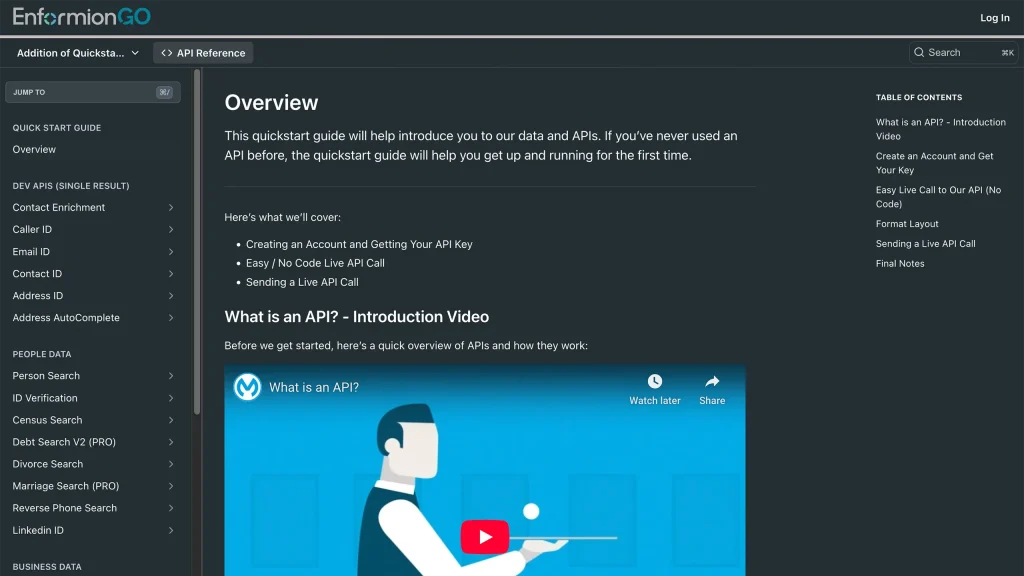
Getting familiar with how to use EnformionGO’s search and API products is very helpful in deciding what products you’ll want to use. We’ve created this quick start guide to walk new users through how to use EnformionGO. Happy searching!

Pro License Data

Filter Pro License Data using the fields below.

  • License Status
    • Multi select
      Description: Select the license status(es) you want to target. You can select more than one


  • License Issuing State
    • Multi select
      Description: Select the license issuing state(s) you want to target. You can select more than one.


  • License Issuing Date Range
    • Select the date range for when the target matches had their license issued.
  • License Expiration Date Range
    • Select the date range for when the target matches had their license expire.

Workplace & Corporation Data

Filter Workplace Data using the fields below.

  • Years at Company
    • Field type: input
    • Description: Enter the number of years at a company for your target matches.
  • Job Title Level
    • Multi select
      Description: Select the job title level(s) you want to target. You can select more than one.
  • Department
    • Multi select
      Description: Select the department(s) you want to target. You can select more than one.
  • Company Revenue Range
    • Field type: range – min/max ($0 – $100,000,000)
    • Description: Set the company revenue range for your matches
  • Company Size
    • Field type: range – min/max (0 – 10,000)
    • Description: Set the company size range for your matches
  • Office Location City
    • Field type: input
    • Description: Enter the office location city name you want to target
 
  • Office Location County
    • Field type: input
    • Description: Enter the office location county name you want to target
  • Office Location State
    • Field type: Multi-select
    • Description: Select the office location state(s) you want to target. You can select more than one.
  • Office Location Zip
    • Field type: input
    • Description: Enter the office location zip code you want to target

Property Data

Filter Property Data using the fields below.

  • Number of Property Owners
    • Field type: range – min/max (0 – 50)
    • Description: Set the range of the number of owners for one of the properties linked to each match you want to target
  • Land Use Code
    • Field type: input
    • Description: Enter the land use code (number only) for one of the properties linked to each match you want to target. For example, for “1100: Single-Family Home” you would enter “1100”
  • Total Square Footage
    • Field type: input
    • Description: Enter the total square footage (number only) for one of the properties linked to each match you want to target

  • Property Value
    • Field type: range – min/max (0 – 10 million)
    • Description: Set the range of the property value for one of the properties linked to each match you want to target
  • Mortgage Amount
    • Field type: input
    • Description: Enter the mortgage amount (number only) for one of the properties linked to each match you want to target
  • Purchase Date
    • Field type: input
    • Description: Enter the purchase date (number only) for one of the properties linked to each match you want to target
  • Property Type
    • Multi select
      Description: Select the property type(s) you want to target. You can select more than one.
  • Owner Type
    • Multi select
      Description: Select the owner type(s) you want to target. You can select more than one.
  • Owner Status
    • Multi select
      Description: Select the owner status(es) you want to target. You can select more than one.
  • Owner Occupied
    • Field type: Boolean
    • Description: Select if you require for one of the properties to be owner-occupied

Consumer Insights Data

Filter Consumer Insights Data using the fields below.

  • Presence of Children
    • Field type: Boolean
    • Description: Select if you require matches with children present in the household
    •  
  • Credit Card Holder
    • Field type: Boolean
    • Description: Select if you require matches to be a credit card holder
  • Interest in Travel
    • Field type: Boolean
    • Description: Select if you require matches to be interested in travel
  • Interest in Cooking
    • Field type: Boolean
    • Description: Select if you require matches to be interested in cooking
  • Interest in Reading
    • Field type: Boolean
    • Description: Select if you require matches to be interested in reading


  • Smoker
    • Field type: Boolean
    • Description: Select if you require matches to be a smoker
  • Exercise Enthusiast
    • Field type: Boolean
    • Description: Select if you require matches to be an exercise enthusiast
  • Exercise with Running
    • Field type: Boolean
    • Description: Select if you require matches who run for exercise
  • Exercise with Walking
    • Field type: Boolean
    • Description: Select if you require matches who walk for exercise
  • Does Aerobic Exercise
    • Field type: Boolean
    • Description: Select if you require matches who do aerobic exercise
  • Into Camping / Hiking
    • Field type: Boolean
    • Description: Select if you require matches who are interested in camping / hiking 
  • Into Natural Foods
    • Field type: Boolean
    • Description: Select if you require matches who are interested in natural foods
  • Into Beauty Health
    • Field type: Boolean
    • Description: Select if you require matches who are interested in health / beauty
  • Into Medical Health
    • Field type: Boolean
    • Description: Select if you require matches who are interested in health / medicine
  • Into the Outdoors
    • Field type: Boolean
    • Description: Select if you require matches who are interested in the outdoors
  • Into Sporty Living
    • Field type: Boolean
    • Description: Select if you require matches who are interested in the outdoors

Location Data

Filter Location Data using the fields below.

  • City
    • Field type: input
    • Description: Enter the city name you want to target
  • County
    • Field type: input
    • Description: Enter the county name you want to target
  • State
    • Field type: Multi-select
    • Description: Select the state(s) you want to target. You can select more than one.
  • Zip
    • Field type: input
    • Description: Enter the zip code you want to target
  • Population Designation
    • Field type: Multi-select
    • Description: Select the population type(s) you want to target. You can select more than one.

Person Data

Filter Person Data using the fields below.

  • Age
    • Field type: range – min/max (18 – 120)
    • Description: Set the age range for your matches
  • Education Level
    • Multi select
      Description: Select the education level(s) you want to target. You can select more than one.
  • Credit Score
    • Field type: range – min/max (0 – 850)
    • Description: Set the credit score range for your matches
  • Estimated Income
    • Field type: range – min/max ($0 – $250,000)
    • Description: Set the income range for your matches. Max setting is $250,000+.
  • Number of Properties Owned
    • Field type: range – min/max (0 – 50)
    • Description: Set the owned properties range for your matches
  • Occupation Level
    • Multi select
      Description: Select the occupation level(s) you want to target. You can select more than one.
  • Marital Status
    • Multi select
      Description: Select the marital status(es) you want to target. You can select more than one.
  • Gender
    • Multi select
      Description: Select the gender(s) you want to target. You can select more than one. Default is all.