Skip Tracing and Public Records Research Explained

Skip tracing is the process of researching publicly available contact and ownership information. Commonly used in industries like real estate, collections, legal services, and sales, skip tracing combines public records, data analysis, and investigative techniques to reconnect with individuals efficiently and accurately.

As access to data has evolved, modern skip tracing has become faster, more precise, and highly scalable—especially with the help of advanced data intelligence platforms like EnformionGO.

What Is Skip Tracing?

Skip tracing refers to the act of “skipping” through various data sources to “trace” an individual’s current location or contact details. The term originated from debt collectors searching for individuals who had “skipped town,” but today it has expanded into many professional use cases.

Skip tracing is commonly used to find:

  • Property owners

  • Leads for real estate opportunities

  • Public record and business research purposes

  • Customers for sales outreach

  • Contacts for identity verification

What Is Skip Tracing

How Skip Tracing Works

Modern skip tracing relies on aggregating and analyzing large volumes of data from multiple sources. Instead of manual searches, professionals now use platforms that automate the process and deliver accurate results in seconds.

Key Steps in the Skip Tracing Process

1. Data Collection

Skip tracing begins with gathering available information such as:

  • Name

  • Phone number

  • Email address

  • Last known address

2. Data Cross-Referencing

This information is then cross-referenced against multiple databases, including:

  • Public records

  • Property records

  • Business filings

  • Court records

3. Data Matching

Advanced systems match data points to improve record consistency and reduce duplicates.

4. Real-Time Updates

The most effective solutions provide real-time data updates, ensuring the information is current and actionable.

Why Skip Tracing Is Important

Skip tracing plays a critical role in helping businesses make informed decisions and connect with the right people.

Benefits of Skip Tracing

  • Improved lead generation for real estate and sales teams

  • Faster contact discovery for outreach campaigns

  • Improved public record research efficiency

  • Better data accuracy through cross-referenced sources

  • Time savings compared to manual research
Why Skip Tracing Is Important

Skip Tracing for Different Industries

Real Estate Professionals

Realtors and investors use skip tracing to identify property owners, uncover off-market opportunities, and connect with motivated sellers.

Developers

Developers rely on accurate ownership and contact data to acquire land and manage projects efficiently.

Marketers & Sales Teams

Skip tracing enables targeted outreach by helping teams reach the right prospects with verified contact details.

Legal & Investigative Use

Professionals may use public records research tools to organize and analyze publicly available records related to legal matters.

The Role of Data Intelligence in Skip Tracing

Traditional skip tracing methods often required hours of manual effort. Today, data intelligence platforms streamline the process by aggregating thousands of data sources into a single, easy-to-use system.

EnformionGO is a powerful example of this evolution. It utilizes information from over 6,000 unique data sources to perform public record inquiries and cross-reference existing data in real time.

With EnformionGO, users can access:

  • Identity and people data

  • Business records

  • Asset and property information

  • Court and legal records

All of this is available through both self-service searches and API integrations, making it easy to scale skip tracing efforts across teams and workflows. If you’re looking to simplify and accelerate your data research, it’s easy to get started and explore its capabilities firsthand.

How EnformionGO Enhances Skip Tracing

EnformionGO provides a modern, efficient approach to skip tracing by combining data depth with ease of use.

Key Advantages

  • Comprehensive Data Coverage
    Access millions of records from thousands of verified sources.

  • Real-Time Results
    Retrieve up-to-date information instantly.

  • User-Friendly Interface
    Perform searches quickly without complex setup.

  • API Integration
    Seamlessly integrate skip tracing into your existing systems.

  • Accurate Identity Matching
    Cross-referenced data improves confidence in results.

Whether you’re identifying new leads or verifying existing contacts, EnformionGO delivers the insights needed to act with confidence. Many professionals choose to get started early to unlock more efficient workflows and better data-driven outcomes.

Best Practices for Effective Skip Tracing

To maximize results, consider the following strategies:

  • Start with as much accurate information as possible

  • Use multiple data points for verification

  • Leverage platforms with real-time data access

  • Maintain compliance with data usage regulations

  • Continuously refine search criteria

The Future of Skip Tracing

As data availability continues to grow, skip tracing will become even more powerful and precise. Automation, artificial intelligence, and real-time data integration are shaping a future where finding accurate information is faster and more reliable than ever.

Platforms like EnformionGO are at the forefront of this transformation, helping professionals across industries access trusted data and streamline their workflows.

Skip tracing is an essential tool for modern businesses looking to connect with people, verify identities, and uncover opportunities. By leveraging a comprehensive data intelligence platform, professionals can transform what was once a manual process into a seamless, scalable solution—making now the perfect time to get started.
Enformiongo api documentation readme

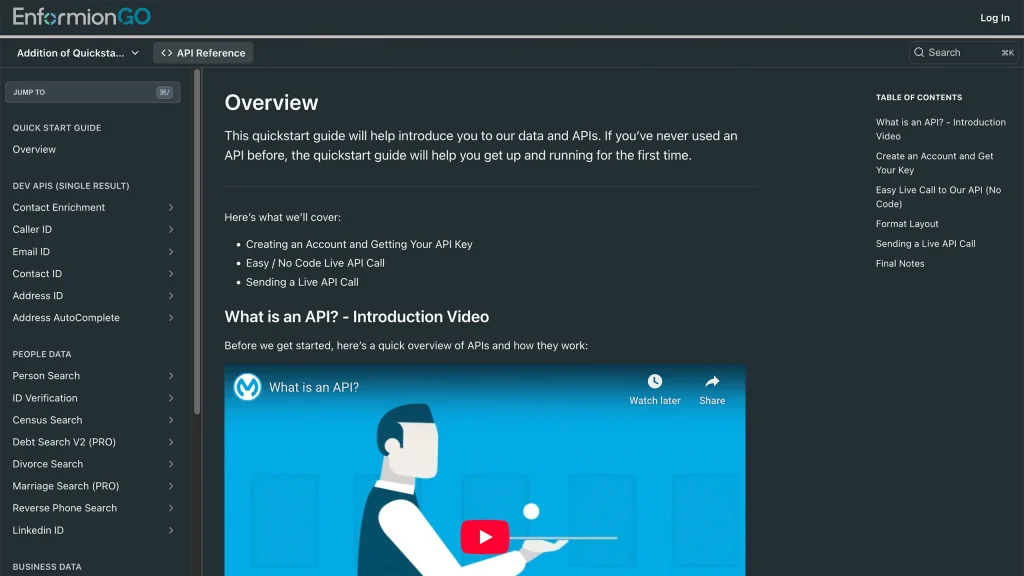
Getting familiar with how to use EnformionGO’s search and API products is very helpful in deciding what products you’ll want to use. We’ve created this quick start guide to walk new users through how to use EnformionGO. Happy searching!

Pro License Data

Filter Pro License Data using the fields below.

  • License Status
    • Multi select
      Description: Select the license status(es) you want to target. You can select more than one


  • License Issuing State
    • Multi select
      Description: Select the license issuing state(s) you want to target. You can select more than one.


  • License Issuing Date Range
    • Select the date range for when the target matches had their license issued.
  • License Expiration Date Range
    • Select the date range for when the target matches had their license expire.

Workplace & Corporation Data

Filter Workplace Data using the fields below.

  • Years at Company
    • Field type: input
    • Description: Enter the number of years at a company for your target matches.
  • Job Title Level
    • Multi select
      Description: Select the job title level(s) you want to target. You can select more than one.
  • Department
    • Multi select
      Description: Select the department(s) you want to target. You can select more than one.
  • Company Revenue Range
    • Field type: range – min/max ($0 – $100,000,000)
    • Description: Set the company revenue range for your matches
  • Company Size
    • Field type: range – min/max (0 – 10,000)
    • Description: Set the company size range for your matches
  • Office Location City
    • Field type: input
    • Description: Enter the office location city name you want to target
 
  • Office Location County
    • Field type: input
    • Description: Enter the office location county name you want to target
  • Office Location State
    • Field type: Multi-select
    • Description: Select the office location state(s) you want to target. You can select more than one.
  • Office Location Zip
    • Field type: input
    • Description: Enter the office location zip code you want to target

Property Data

Filter Property Data using the fields below.

  • Number of Property Owners
    • Field type: range – min/max (0 – 50)
    • Description: Set the range of the number of owners for one of the properties linked to each match you want to target
  • Land Use Code
    • Field type: input
    • Description: Enter the land use code (number only) for one of the properties linked to each match you want to target. For example, for “1100: Single-Family Home” you would enter “1100”
  • Total Square Footage
    • Field type: input
    • Description: Enter the total square footage (number only) for one of the properties linked to each match you want to target

  • Property Value
    • Field type: range – min/max (0 – 10 million)
    • Description: Set the range of the property value for one of the properties linked to each match you want to target
  • Mortgage Amount
    • Field type: input
    • Description: Enter the mortgage amount (number only) for one of the properties linked to each match you want to target
  • Purchase Date
    • Field type: input
    • Description: Enter the purchase date (number only) for one of the properties linked to each match you want to target
  • Property Type
    • Multi select
      Description: Select the property type(s) you want to target. You can select more than one.
  • Owner Type
    • Multi select
      Description: Select the owner type(s) you want to target. You can select more than one.
  • Owner Status
    • Multi select
      Description: Select the owner status(es) you want to target. You can select more than one.
  • Owner Occupied
    • Field type: Boolean
    • Description: Select if you require for one of the properties to be owner-occupied

Consumer Insights Data

Filter Consumer Insights Data using the fields below.

  • Presence of Children
    • Field type: Boolean
    • Description: Select if you require matches with children present in the household
    •  
  • Credit Card Holder
    • Field type: Boolean
    • Description: Select if you require matches to be a credit card holder
  • Interest in Travel
    • Field type: Boolean
    • Description: Select if you require matches to be interested in travel
  • Interest in Cooking
    • Field type: Boolean
    • Description: Select if you require matches to be interested in cooking
  • Interest in Reading
    • Field type: Boolean
    • Description: Select if you require matches to be interested in reading


  • Smoker
    • Field type: Boolean
    • Description: Select if you require matches to be a smoker
  • Exercise Enthusiast
    • Field type: Boolean
    • Description: Select if you require matches to be an exercise enthusiast
  • Exercise with Running
    • Field type: Boolean
    • Description: Select if you require matches who run for exercise
  • Exercise with Walking
    • Field type: Boolean
    • Description: Select if you require matches who walk for exercise
  • Does Aerobic Exercise
    • Field type: Boolean
    • Description: Select if you require matches who do aerobic exercise
  • Into Camping / Hiking
    • Field type: Boolean
    • Description: Select if you require matches who are interested in camping / hiking 
  • Into Natural Foods
    • Field type: Boolean
    • Description: Select if you require matches who are interested in natural foods
  • Into Beauty Health
    • Field type: Boolean
    • Description: Select if you require matches who are interested in health / beauty
  • Into Medical Health
    • Field type: Boolean
    • Description: Select if you require matches who are interested in health / medicine
  • Into the Outdoors
    • Field type: Boolean
    • Description: Select if you require matches who are interested in the outdoors
  • Into Sporty Living
    • Field type: Boolean
    • Description: Select if you require matches who are interested in the outdoors

Location Data

Filter Location Data using the fields below.

  • City
    • Field type: input
    • Description: Enter the city name you want to target
  • County
    • Field type: input
    • Description: Enter the county name you want to target
  • State
    • Field type: Multi-select
    • Description: Select the state(s) you want to target. You can select more than one.
  • Zip
    • Field type: input
    • Description: Enter the zip code you want to target
  • Population Designation
    • Field type: Multi-select
    • Description: Select the population type(s) you want to target. You can select more than one.

Person Data

Filter Person Data using the fields below.

  • Age
    • Field type: range – min/max (18 – 120)
    • Description: Set the age range for your matches
  • Education Level
    • Multi select
      Description: Select the education level(s) you want to target. You can select more than one.
  • Credit Score
    • Field type: range – min/max (0 – 850)
    • Description: Set the credit score range for your matches
  • Estimated Income
    • Field type: range – min/max ($0 – $250,000)
    • Description: Set the income range for your matches. Max setting is $250,000+.
  • Number of Properties Owned
    • Field type: range – min/max (0 – 50)
    • Description: Set the owned properties range for your matches
  • Occupation Level
    • Multi select
      Description: Select the occupation level(s) you want to target. You can select more than one.
  • Marital Status
    • Multi select
      Description: Select the marital status(es) you want to target. You can select more than one.
  • Gender
    • Multi select
      Description: Select the gender(s) you want to target. You can select more than one. Default is all.