The Leading Phone Intelligence and Reverse Phone API

From Startups to Fortune 500's, power your application and enrich your people data from over 300 million people profiles.

Create Your Account

Sign Up to get instant access to run Free
and Live Phone and Contact Enrich API Calls Now!

Sign Up to get instant access to run Free
and Live Phone and Contact Enrich API Calls Now!

Enter email Address

Already have an account? Sign in now

The EnformionGO Difference

We thrive to be the leader in Contact Enrichment by providing better matches, with better data, with the best pricing.

Smart Matching

The only API that will run 1000's of sub searches, scoring each match, and returning a high-quality single result match

Deep Data

120+ Billion Records
6,000 Data Sources
3M records Added Monthly
Data Refreshed Daily

Instant Results

Response Time Under 300ms
SLA Uptime Guarantee 99.9%
World Class Tier 1 Data Center
Built by Devs for Devs

No Risk

Free 100 Monthly Matches
Sign-Up In Minutes
No Setup or Monthly Fees
No Contract or Minimums

Graphic depicting a marketer reviewing contact enrichment API

Less Than a Minute Sign Up!

We make it easy (and free) to start testing live data calls.

No Credit Card
No Fees
No Contracts
No Mininums
No Code Solutions

About Us

EnformionGO founders are industry pioneers and experts in the data technology industry. Designed by the creators of a leading Data-as-a-Service (DaaS) business-to-consumer public records provider, EnformionGO provides data and intelligence to government and commercial organizations, with more than 6,000 data sources and 120 billion records.

Built on next-generation technology and data solutions, EnformionGO leverages 20 years of experience to provide powerful search technology and deliver billions of records via the investigative cloud-based platform, API, and batch processing.

Graphic depicting data marketers practicing marketing solution lead building

Phone Intelligence API Solves For

Key Benefits

An icon signifying a simple online sign-up menu

Simplify sign-up flows

Only a phone number is needed to support mobile-driven sign-ups, enabling you to assess risk without requiring additional customer input.

An icon of a technical support specialist speaking on a headset

Flag risky users during sign-Up

Use authoritative phone data to flag risky users and deter fraudulent transactions without preventing account opening altogether.

An icon of a group of people signifying a group of customers

Route good customers to fast, low-friction experiences

Provide a low-friction transaction experience for good customers by automatically accepting low-risk customer sign-ups.

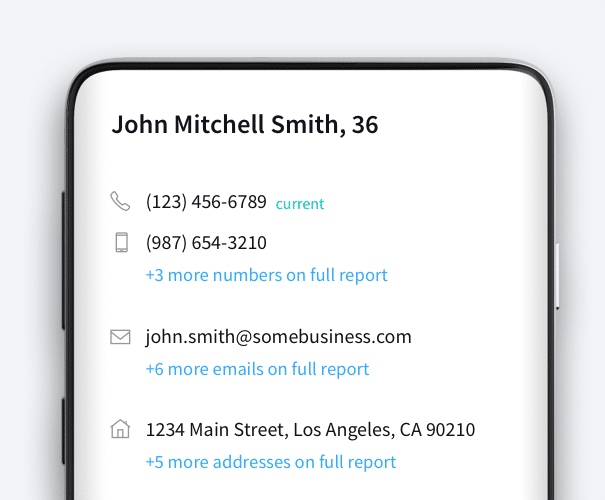
An example of EnformionGO’s API showcasing information on John Mitchell Smith

Power Your Products Like Never Before

Create amazing data-driven solutions from our flexible data APIs
Enrich and bulk append your contact information
Validate, de-dupe, and merge your current data
Highlight reported date and current status

No Minimums, Contracts, or Hidden Fees

Get started today with a Free Account or schedule a call with our sales consultant.

Fresh, Reliable, Real-Time Data

EnformionGO gives developers access to broad and accurate data sets more than 30 years in the making. Our data consists of more than 43 billion records on adults in the U.S. from over 6,000 data sources…and counting.

An icon signifying a simple online sign-up menu

Leading United States Data

More than 98% coverage of Adults in the United States

An icon of a group of people signifying a group of customers

260+ Million US People Profiles

120+ Billion Records from Over 6,000 Data Sources. 3M records added monthly

An icon of a mobile phone

#1 in Mobile Phone Data

Leading accuracy with last reported date, is connected status and more

An icon of a receipt and a coin signifying affordable data

Affordable Premium Data

Competitive pricing with no minimums, contracts or hidden fees

Example Requests and Responses

CallerID Example
Pass any 10 digit U.S. based phone number and get a detailed report on our best match.
Sample Request
Sample Response
				
					{"phone":"1234567890"}
				
			
Contact Enrichment Example
Pass 2 or more of the below fields and get a detailed report on our best match:
Full Name, Phone, Email, Full / Partial Address
Sample Request
Sample Response
				
					{"FirstName":"John","LastName":"Smith","Address":{"addressLine1":"1234 Main Street","addressLine2":"Los Angeles, CA"}}


Pro License Data

Filter Pro License Data using the fields below.

  • License Status
    • Multi select
      Description: Select the license status(es) you want to target. You can select more than one


  • License Issuing State
    • Multi select
      Description: Select the license issuing state(s) you want to target. You can select more than one.


  • License Issuing Date Range
    • Select the date range for when the target matches had their license issued.
  • License Expiration Date Range
    • Select the date range for when the target matches had their license expire.

Workplace & Corporation Data

Filter Workplace Data using the fields below.

  • Years at Company
    • Field type: input
    • Description: Enter the number of years at a company for your target matches.
  • Job Title Level
    • Multi select
      Description: Select the job title level(s) you want to target. You can select more than one.
  • Department
    • Multi select
      Description: Select the department(s) you want to target. You can select more than one.
  • Company Revenue Range
    • Field type: range – min/max ($0 – $100,000,000)
    • Description: Set the company revenue range for your matches
  • Company Size
    • Field type: range – min/max (0 – 10,000)
    • Description: Set the company size range for your matches
  • Office Location City
    • Field type: input
    • Description: Enter the office location city name you want to target
 
  • Office Location County
    • Field type: input
    • Description: Enter the office location county name you want to target
  • Office Location State
    • Field type: Multi-select
    • Description: Select the office location state(s) you want to target. You can select more than one.
  • Office Location Zip
    • Field type: input
    • Description: Enter the office location zip code you want to target

Property Data

Filter Property Data using the fields below.

  • Number of Property Owners
    • Field type: range – min/max (0 – 50)
    • Description: Set the range of the number of owners for one of the properties linked to each match you want to target
  • Land Use Code
    • Field type: input
    • Description: Enter the land use code (number only) for one of the properties linked to each match you want to target. For example, for “1100: Single-Family Home” you would enter “1100”
  • Total Square Footage
    • Field type: input
    • Description: Enter the total square footage (number only) for one of the properties linked to each match you want to target

  • Property Value
    • Field type: range – min/max (0 – 10 million)
    • Description: Set the range of the property value for one of the properties linked to each match you want to target
  • Mortgage Amount
    • Field type: input
    • Description: Enter the mortgage amount (number only) for one of the properties linked to each match you want to target
  • Purchase Date
    • Field type: input
    • Description: Enter the purchase date (number only) for one of the properties linked to each match you want to target
  • Property Type
    • Multi select
      Description: Select the property type(s) you want to target. You can select more than one.
  • Owner Type
    • Multi select
      Description: Select the owner type(s) you want to target. You can select more than one.
  • Owner Status
    • Multi select
      Description: Select the owner status(es) you want to target. You can select more than one.
  • Owner Occupied
    • Field type: Boolean
    • Description: Select if you require for one of the properties to be owner-occupied

Consumer Insights Data

Filter Consumer Insights Data using the fields below.

  • Presence of Children
    • Field type: Boolean
    • Description: Select if you require matches with children present in the household
    •  
  • Credit Card Holder
    • Field type: Boolean
    • Description: Select if you require matches to be a credit card holder
  • Interest in Travel
    • Field type: Boolean
    • Description: Select if you require matches to be interested in travel
  • Interest in Cooking
    • Field type: Boolean
    • Description: Select if you require matches to be interested in cooking
  • Interest in Reading
    • Field type: Boolean
    • Description: Select if you require matches to be interested in reading


  • Smoker
    • Field type: Boolean
    • Description: Select if you require matches to be a smoker
  • Exercise Enthusiast
    • Field type: Boolean
    • Description: Select if you require matches to be an exercise enthusiast
  • Exercise with Running
    • Field type: Boolean
    • Description: Select if you require matches who run for exercise
  • Exercise with Walking
    • Field type: Boolean
    • Description: Select if you require matches who walk for exercise
  • Does Aerobic Exercise
    • Field type: Boolean
    • Description: Select if you require matches who do aerobic exercise
  • Into Camping / Hiking
    • Field type: Boolean
    • Description: Select if you require matches who are interested in camping / hiking 
  • Into Natural Foods
    • Field type: Boolean
    • Description: Select if you require matches who are interested in natural foods
  • Into Beauty Health
    • Field type: Boolean
    • Description: Select if you require matches who are interested in health / beauty
  • Into Medical Health
    • Field type: Boolean
    • Description: Select if you require matches who are interested in health / medicine
  • Into the Outdoors
    • Field type: Boolean
    • Description: Select if you require matches who are interested in the outdoors
  • Into Sporty Living
    • Field type: Boolean
    • Description: Select if you require matches who are interested in the outdoors

Location Data

Filter Location Data using the fields below.

  • City
    • Field type: input
    • Description: Enter the city name you want to target
  • County
    • Field type: input
    • Description: Enter the county name you want to target
  • State
    • Field type: Multi-select
    • Description: Select the state(s) you want to target. You can select more than one.
  • Zip
    • Field type: input
    • Description: Enter the zip code you want to target
  • Population Designation
    • Field type: Multi-select
    • Description: Select the population type(s) you want to target. You can select more than one.

Person Data

Filter Person Data using the fields below.

  • Age
    • Field type: range – min/max (18 – 120)
    • Description: Set the age range for your matches
  • Education Level
    • Multi select
      Description: Select the education level(s) you want to target. You can select more than one.
  • Credit Score
    • Field type: range – min/max (0 – 850)
    • Description: Set the credit score range for your matches
  • Estimated Income
    • Field type: range – min/max ($0 – $250,000)
    • Description: Set the income range for your matches. Max setting is $250,000+.
  • Number of Properties Owned
    • Field type: range – min/max (0 – 50)
    • Description: Set the owned properties range for your matches
  • Occupation Level
    • Multi select
      Description: Select the occupation level(s) you want to target. You can select more than one.
  • Marital Status
    • Multi select
      Description: Select the marital status(es) you want to target. You can select more than one.
  • Gender
    • Multi select
      Description: Select the gender(s) you want to target. You can select more than one. Default is all.