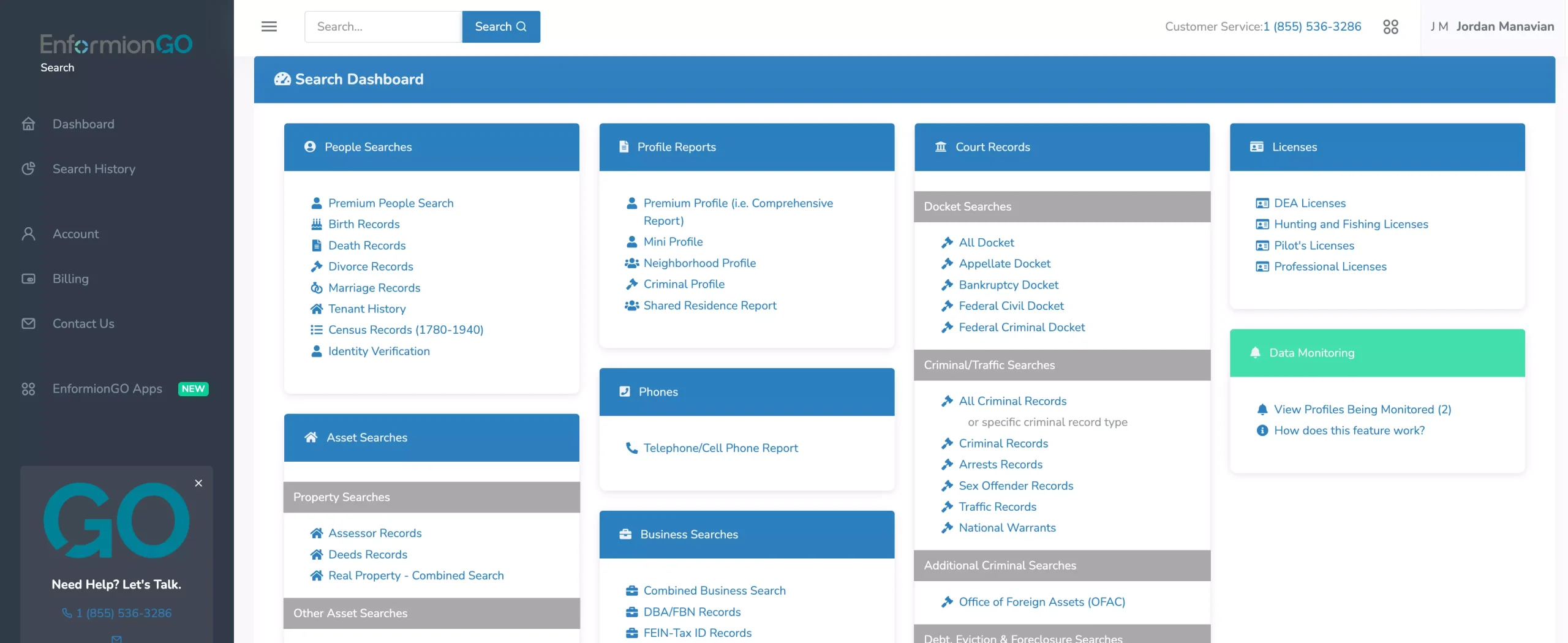
So, you’re interested in EnformionGO products but don’t know where to start? This guide will help you find the right product to provide you with the information you need.
Here's Where You Start
EnformionGO has many products that all serve different and specific purposes, so it’s understandable that you may not know which products are right for you. Let’s begin by taking a look at how our data is categorized. All EnformionGO products fall under one of the following data sets: People, Work, Property, Court Records, Assets, and License data.
People Data
Products listed here are for finding information on people, enrichment of contact lists, and linking incomplete data with reliable matches.
Work Data
This is where products for finding information on employers and businesses will be listed. Work data can consist of address, DBA/FBN, tax information, employee information, and more.
Property Data
For all products that return information about specific properties, home history, and other key details.
Court Records Data
Products under this category are used for easily finding publicly available court record information and other legal details.
Asset Data
This category houses our products that focus on asset information, such as vehicle history, domain registration, assessor records, and details for linked individuals.
License Data
Products here provide returns for all available information on specific licenses, or to search for detailed reports on professional license data.
EnformionGO products are all classified as one of two product types, Search or API, each with its own online dashboard for customers to manage separately. The data sets listed above categorize both Search and API product types.
With different data sets and product types to consider, how do you find the right product for the service you need? Let’s break down how EnformionGO is used with some of our most common use cases.
Developers
EnformionGO API products are great for developers who are looking to improve the functionality of their websites with increased depth of data for user-facing applications. EnformionGO’s developer products give users added confidence and accuracy in designing data-gathering applications while making it easy to apply in their existing platforms and services.
Sales
Sales representatives use EnformionGO to improve accuracy on lead datapoints, linking incomplete contact information with the appropriate customers and correct data. Better customer data directly helps sales teams indentify high-value leads and achieve an overall better return on customer engagement.
Marketing
EnformionGO products are popular tools for assisting with marketing data acquisition, most often using our “Contact Enrichment” API to collect detailed information on customers for improving marketing analytics. Detailed customer data helps companies create lead-rich target audiences that cater to specific demographics such as age, address, financial status, and more.
Real Estate
Realtors use EnformionGO for conducting research on properties, potential buyers, sellers, home history, and more. Connecting personal information with specific properties helps realtors stay informed with up-to-date data on their listings and clients while improving key insights for data-driven decision-making.
How EnformionGO Has Helped Other Companies
Here are some examples of how EnformionGO has helped customers in the past:
Marketing Agency
A digital ad agency working with large consumer brands needed help building effective target audience segments for marketing appropriate consumer goods to the right leads. Organic website form signups were also performing less than ideal, leading to fewer new customers coming in, and disorganization for the ones that have signed up.
Using EnformionGO’s Data Enrichment API and signup form optimization, new customers were signing up in higher numbers by requiring minimal contact information. With increased and stabilized signup rates, EnformionGO’s Contact Enrichment API helped enhance these leads by providing additional detailed customer information. This made it possible to market age-specific products to the correct target audiences (such as alcohol products, age-restricted apps, and goods requiring ID verification), as well as other products aimed at specific customer segments. By optimizing new customer signup form efficiency and marketing efforts with contact enrichment, they saw higher customer response rates, better target audience segmenting, and overall increased RIO for the large consumer brands represented.
Home Solar Company
A residential solar provider used EnformionGO to help with improving direct sales. In-house generated leads and prospect lists were holding incomplete data, often only providing the address for potential homes that could utilize solar power. Leads would be given an address and a “sun score”, ranking the overall sun exposure for a specific property, however, the contact information for these leads was not always provided.
By using the contact enrichment API, they were able to improve their marketing intelligence by appending and enriching missing data points from prospect lists. This connected the missing links between address and owner information, allowing their sales team to build a more full and accurate profile for prospects. Direct sales were improved and newly generated leads were able to be improved going forward.
Real Estate Data Services
Real Estate companies will often rely on customer data providers to engage the right target audiences or improve sales intelligence. A real estate data provider responsible for improving customer data used EnformionGO to bridge the gap between property owner information and the appropriate contact information for those owners.
Providing minimal information such as name or address, they used EnformionGO API to return right party contact information such as email or phone, and other data points to qualify and segment prospects for better outreach.
Getting familiar with how to use EnformionGO’s search and API products is very helpful in deciding what products you’ll want to use. We’ve created this quick start guide to walk new users through how to use EnformionGO. Happy searching!
Pro License Data
Filter Pro License Data using the fields below.
License Status
Multi select Description: Select the license status(es) you want to target. You can select more than one
License Issuing State
Multi select Description: Select the license issuing state(s) you want to target. You can select more than one.
License Issuing Date Range
Select the date range for when the target matches had their license issued.
License Expiration Date Range
Select the date range for when the target matches had their license expire.
Workplace & Corporation Data
Filter Workplace Data using the fields below.
Years at Company
Field type: input
Description: Enter the number of years at a company for your target matches.
Job Title Level
Multi select Description: Select the job title level(s) you want to target. You can select more than one.
Department
Multi select Description: Select the department(s) you want to target. You can select more than one.
Company Revenue Range
Field type: range – min/max ($0 – $100,000,000)
Description: Set the company revenue range for your matches
Company Size
Field type: range – min/max (0 – 10,000)
Description: Set the company size range for your matches
Office Location City
Field type: input
Description: Enter the office location city name you want to target
Office Location County
Field type: input
Description: Enter the office location county name you want to target
Office Location State
Field type: Multi-select
Description: Select the office location state(s) you want to target. You can select more than one.
Office Location Zip
Field type: input
Description: Enter the office location zip code you want to target
Property Data
Filter Property Data using the fields below.
Number of Property Owners
Field type: range – min/max (0 – 50)
Description: Set the range of the number of owners for one of the properties linked to each match you want to target
Land Use Code
Field type: input
Description: Enter the land use code (number only) for one of the properties linked to each match you want to target. For example, for “1100: Single-Family Home” you would enter “1100”
Total Square Footage
Field type: input
Description: Enter the total square footage (number only) for one of the properties linked to each match you want to target
Property Value
Field type: range – min/max (0 – 10 million)
Description: Set the range of the property value for one of the properties linked to each match you want to target
Mortgage Amount
Field type: input
Description: Enter the mortgage amount (number only) for one of the properties linked to each match you want to target
Purchase Date
Field type: input
Description: Enter the purchase date (number only) for one of the properties linked to each match you want to target
Property Type
Multi select Description: Select the property type(s) you want to target. You can select more than one.
Owner Type
Multi select Description: Select the owner type(s) you want to target. You can select more than one.
Owner Status
Multi select Description: Select the owner status(es) you want to target. You can select more than one.
Owner Occupied
Field type: Boolean
Description: Select if you require for one of the properties to be owner-occupied
Consumer Insights Data
Filter Consumer Insights Data using the fields below.
Presence of Children
Field type: Boolean
Description: Select if you require matches with children present in the household
Credit Card Holder
Field type: Boolean
Description: Select if you require matches to be a credit card holder
Interest in Travel
Field type: Boolean
Description: Select if you require matches to be interested in travel
Interest in Cooking
Field type: Boolean
Description: Select if you require matches to be interested in cooking
Interest in Reading
Field type: Boolean
Description: Select if you require matches to be interested in reading
Smoker
Field type: Boolean
Description: Select if you require matches to be a smoker
Exercise Enthusiast
Field type: Boolean
Description: Select if you require matches to be an exercise enthusiast
Exercise with Running
Field type: Boolean
Description: Select if you require matches who run for exercise
Exercise with Walking
Field type: Boolean
Description: Select if you require matches who walk for exercise
Does Aerobic Exercise
Field type: Boolean
Description: Select if you require matches who do aerobic exercise
Into Camping / Hiking
Field type: Boolean
Description: Select if you require matches who are interested in camping / hiking
Into Natural Foods
Field type: Boolean
Description: Select if you require matches who are interested in natural foods
Into Beauty Health
Field type: Boolean
Description: Select if you require matches who are interested in health / beauty
Into Medical Health
Field type: Boolean
Description: Select if you require matches who are interested in health / medicine
Into the Outdoors
Field type: Boolean
Description: Select if you require matches who are interested in the outdoors
Into Sporty Living
Field type: Boolean
Description: Select if you require matches who are interested in the outdoors
Location Data
Filter Location Data using the fields below.
City
Field type: input
Description: Enter the city name you want to target
County
Field type: input
Description: Enter the county name you want to target
State
Field type: Multi-select
Description: Select the state(s) you want to target. You can select more than one.
Zip
Field type: input
Description: Enter the zip code you want to target
Population Designation
Field type: Multi-select
Description: Select the population type(s) you want to target. You can select more than one.
Person Data
Filter Person Data using the fields below.
Age
Field type: range – min/max (18 – 120)
Description: Set the age range for your matches
Education Level
Multi select Description: Select the education level(s) you want to target. You can select more than one.
Credit Score
Field type: range – min/max (0 – 850)
Description: Set the credit score range for your matches
Estimated Income
Field type: range – min/max ($0 – $250,000)
Description: Set the income range for your matches. Max setting is $250,000+.
Number of Properties Owned
Field type: range – min/max (0 – 50)
Description: Set the owned properties range for your matches
Occupation Level
Multi select Description: Select the occupation level(s) you want to target. You can select more than one.
Marital Status
Multi select Description: Select the marital status(es) you want to target. You can select more than one.
Gender
Multi select Description: Select the gender(s) you want to target. You can select more than one. Default is all.