


























What Is An API And How Does It Work?

An API stands for Application Programming Interface. Basically, an API is a program that allows two or more systems to communicate with and transmit data between each other.

APIs bridge the gap between different applications to allow you to quickly integrate different features into your interface without needing to re-design your infrastructure. With API, your business can instantly access data and gain more flexibility of use. Your web developers can customize your current software to better meet your own needs and the needs of your customers — all with minimal effort.

A graphic depicting a woman shopping that signifies marketing identity

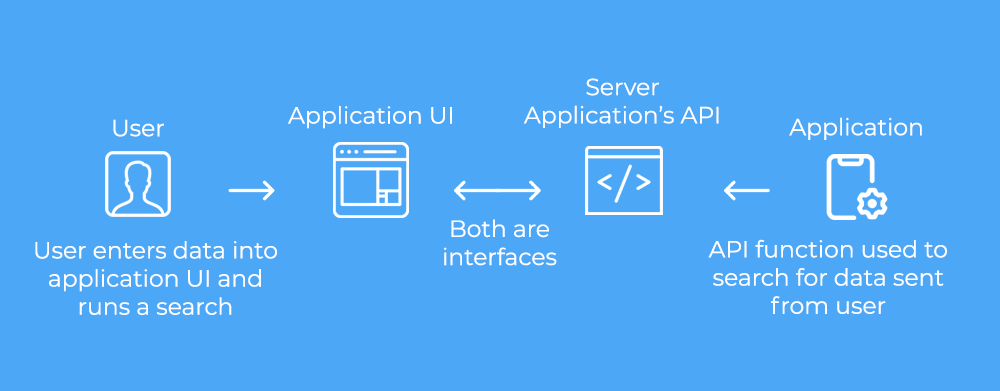
APIs work as a translator between a customer-facing user interface and the server it’s reaching out to. Essentially, APIs are responsible for data reaching users.

For example, someone using a mobile application will encounter a user interface, with options to type and share a message with other users. While the user will be able to find the text box, type, and subsequently click on the “share” button, a server will need to interpret this same data in a format that functions for this specific application. In short, the API takes care of everything on the backend of a user-friendly interface, making complicated tasks easy.

A graphic depicting a workflow of how an API works

Sending employees and customers to a third-party web browser to do certain tasks, like perform a people search or go through identity verification, takes up valuable time and disrupts their day-to-day routines. However, when your employees and customers can go through a single, cohesive platform, they’ll have a better, smoother experience overall. 

When you integrate data into your own platform with API, you can instantly access all the customer data you need, right when you need it. Rather than sending your customers and employees to a third-party service, they can do whatever they need to do with the software they are currently working with. Being able to perform all your searches for both external and internal use in one cohesive platform will not only boost efficiency, but will also increase employee and customer satisfaction — in turn leading to growth.

If people searching is a part of your job, whether you’re a legal professional or investigator, a people search API can help streamline your workflow by providing you with the additional data you need for a people search from your own software. Even if you don’t have all the records and technology you would need to run through a people search yourself, you can pull from the data via an API and run it through software that fits your brand identity.

When you integrate a people search with API, you can utilize over 120 billion records from EnformionGO to make your searching options easier and customize your people search needs to suit your unique desires. Whether it’s a basic people search or a more complex search, you can seamlessly integrate it into your own platform with API for a more flexible and streamlined workflow.

Can My Company Use API Integration Solutions?

If you need access to reliable and comprehensive data but you want to avoid going through a third-party operating system, EnformionGO is a great place to find your API integration solution. EnformionGO API systems have helped these industries streamline their workflows and search more efficiently:

Investigators

Law enforcement agencies

Collections agencies

Corporate financial services

Government organizations

Insurance agencies

Healthcare providers

Legal professionals

These are not the only industries that can benefit from API integration. Any organization that wants greater flexibility and faster results in their searches may be able to benefit from API integration.

An API Integration Platform for Gathering as Much Information as You Need

Depending on your company, you may need different tools and pieces of information. With EnformionGO API, you can access all of this information, plus much more:

  • Relatives and associates.
  • Cellphone suppression.
  • Deceased records.
  • Liens and judgments.
  • Place of employment.
  • Phone numbers.
  • Identity verification. 
  • Reverse phone.
  • Bankruptcies.
  • Address history.
  • Criminal records.
  • Property records.

There are many ways for you to utilize these web APIs to your advantage. Whether you need one piece of data for skip tracing, an entire identity verification system, or comprehensive people searches, you can choose exactly what you want to integrate and customize the results to scale at your own speed. 

A graphic depicting an overhead view of a city showcasing marketing property data
marketing data tenant history

API Recovery Solutions for Quick and Easy Recovery

While web APIs are beneficial to a variety of industries, one industry that can particularly benefit is collections, and that’s because debt recovery requires a lot of tools and information. While some people may outsource collections to third parties, API recovery solutions allow collections agencies to access all the tools and information they need right from their own platform. With instant access to comprehensive data, you can perform quicker recovery and keep collections in-house.

You also need up-to-date contact information about customers and debtors for right-party contact. Web APIs can automatically update the information in your CRM so you can be sure you’re using the most up-to-date information to reach out to people and recover debt. When you can integrate the best recovery tools into your own platform, you’ll be able to find the people you’re looking for and get the information you need to recover debt quickly and easily.

Use API To Access Data for Superior Loan Monitoring

In the collections world, the more delinquent an account is, the more a company will need to start using different data sets outside of address and phones. A modern loan monitoring API will provide additional data that can populate into your current software, including:

  • Bankruptcies
  • Liens
  • Judgments
  • Foreclosures 
  • Evictions

When you can access this information from your own platform, you’ll be able to monitor loans more efficiently and stay up-to-date on every account, even as situations change.

marketing data property search

More Information

What is an API?

An API integration allows you to integrate a searching tool with your own software so you can perform searches from your own software rather than going to a third-party website. With API integration, you’re able to create a software that’s fully branded with your own information.

Who Benefits from Using an API?

If you need to gather information and want to save time going to a third-party website, you can benefit from using an API integration. A few of the industries that can benefit from using API are investigators, law enforcement agencies, legal professionals, and financial services.

Why is an API Beneficial?

Integrating searches into your workflow as a whole with API can be an important part of reducing the amount of time you have to spend on each search because you no longer have to switch between different softwares, which can be beneficial for your company. API also makes it simpler to gather the information you’re looking for without ever leaving your own software system or internal website, and helps you create a software that’s fully branded with your own information and logos.

What Do I Need to Get Started With an API?

It’s not enough to just have an API system in general. You need an API system that will provide you with the information you’re looking for. Plus, you need a system that will help you get to that information as soon as possible. With EnformionGO API integration, it’s easier than ever to get that exact information.

Click on the links below for specific details on any product in the EnformionGO suite.

Starter

Address Autocomplete

Fast and verified addresses returned after every keystroke

Starter

AddressID

Find someone’s name and contact info just from an address

Starter

Business Search

Performs a criteria search, and returns a list of matching businesses

Starter

CallerID

Find someone’s name and contact info just from a number

Pro

Census Search

Performs a census search, and returns a list of matching census records

Starter

Contact Enrichment

Enrich your contacts with additional contact info

Starter

ContactID

Check for updates on any previous matched contact

Pro

Criminal Search

Performs a criteria search, and returns a list of matching criminal records

Pro

DEA License

Performs a DEA License search, and returns a list of records matching the search criteria

Pro

Debt Search

Performs a criteria search, and returns a list of bankruptcy, lien, and judgment records

Pro

Divorce Search

Starter

Domain Search

Performs a domain search, and returns a list of domains matching the search criteria

Starter

Email ID

Find someone’s name and contact info just from an email

Pro

Eviction Search

Performs an Eviction search, and returns a list of Eviction records matching the search criteria

Pro

Foreclosure Search

Performs a Foreclosure search, and returns a list of Foreclosure records matching the search criteria

Starter

Identity Verification

Instantly verify someone’s identity and fill-in missing details

Pro

Marriage Search

Pro

Office of Foreign Assets Control

Performs an OFAC search, and returns a list of records matching the search criteria

Starter

Person Search

Performs a person search, and returns a list of people matching the search criteria

Pro

ProLicense Search

Performs a ProLicense search, and returns a list of ProLicense records matching the search criteria

Starter

Property Search

Performs a criteria search, and returns a list of matching Assessor and Recorder records

Starter

Reverse Phone Search

Performs a reverse phone search, and returns a list of people matching the search criteria

Pro

Vehicle Ownership Search

Performs a vehicle ownership search, and returns a list of vehicles matching the search criteria

Starter

Workplace Search

Performs a criteria search, and returns a list of matching businesses

Enformiongo api documentation readme

Getting familiar with how to use EnformionGO’s search and API products is very helpful in deciding what products you’ll want to use. We’ve created this quick start guide to walk new users through how to use EnformionGO. Happy searching!

Pro License Data

Filter Pro License Data using the fields below.

  • License Status
    • Multi select
      Description: Select the license status(es) you want to target. You can select more than one


  • License Issuing State
    • Multi select
      Description: Select the license issuing state(s) you want to target. You can select more than one.


  • License Issuing Date Range
    • Select the date range for when the target matches had their license issued.
  • License Expiration Date Range
    • Select the date range for when the target matches had their license expire.

Workplace & Corporation Data

Filter Workplace Data using the fields below.

  • Years at Company
    • Field type: input
    • Description: Enter the number of years at a company for your target matches.
  • Job Title Level
    • Multi select
      Description: Select the job title level(s) you want to target. You can select more than one.
  • Department
    • Multi select
      Description: Select the department(s) you want to target. You can select more than one.
  • Company Revenue Range
    • Field type: range – min/max ($0 – $100,000,000)
    • Description: Set the company revenue range for your matches
  • Company Size
    • Field type: range – min/max (0 – 10,000)
    • Description: Set the company size range for your matches
  • Office Location City
    • Field type: input
    • Description: Enter the office location city name you want to target
 
  • Office Location County
    • Field type: input
    • Description: Enter the office location county name you want to target
  • Office Location State
    • Field type: Multi-select
    • Description: Select the office location state(s) you want to target. You can select more than one.
  • Office Location Zip
    • Field type: input
    • Description: Enter the office location zip code you want to target

Property Data

Filter Property Data using the fields below.

  • Number of Property Owners
    • Field type: range – min/max (0 – 50)
    • Description: Set the range of the number of owners for one of the properties linked to each match you want to target
  • Land Use Code
    • Field type: input
    • Description: Enter the land use code (number only) for one of the properties linked to each match you want to target. For example, for “1100: Single-Family Home” you would enter “1100”
  • Total Square Footage
    • Field type: input
    • Description: Enter the total square footage (number only) for one of the properties linked to each match you want to target

  • Property Value
    • Field type: range – min/max (0 – 10 million)
    • Description: Set the range of the property value for one of the properties linked to each match you want to target
  • Mortgage Amount
    • Field type: input
    • Description: Enter the mortgage amount (number only) for one of the properties linked to each match you want to target
  • Purchase Date
    • Field type: input
    • Description: Enter the purchase date (number only) for one of the properties linked to each match you want to target
  • Property Type
    • Multi select
      Description: Select the property type(s) you want to target. You can select more than one.
  • Owner Type
    • Multi select
      Description: Select the owner type(s) you want to target. You can select more than one.
  • Owner Status
    • Multi select
      Description: Select the owner status(es) you want to target. You can select more than one.
  • Owner Occupied
    • Field type: Boolean
    • Description: Select if you require for one of the properties to be owner-occupied

Consumer Insights Data

Filter Consumer Insights Data using the fields below.

  • Presence of Children
    • Field type: Boolean
    • Description: Select if you require matches with children present in the household
    •  
  • Credit Card Holder
    • Field type: Boolean
    • Description: Select if you require matches to be a credit card holder
  • Interest in Travel
    • Field type: Boolean
    • Description: Select if you require matches to be interested in travel
  • Interest in Cooking
    • Field type: Boolean
    • Description: Select if you require matches to be interested in cooking
  • Interest in Reading
    • Field type: Boolean
    • Description: Select if you require matches to be interested in reading


  • Smoker
    • Field type: Boolean
    • Description: Select if you require matches to be a smoker
  • Exercise Enthusiast
    • Field type: Boolean
    • Description: Select if you require matches to be an exercise enthusiast
  • Exercise with Running
    • Field type: Boolean
    • Description: Select if you require matches who run for exercise
  • Exercise with Walking
    • Field type: Boolean
    • Description: Select if you require matches who walk for exercise
  • Does Aerobic Exercise
    • Field type: Boolean
    • Description: Select if you require matches who do aerobic exercise
  • Into Camping / Hiking
    • Field type: Boolean
    • Description: Select if you require matches who are interested in camping / hiking 
  • Into Natural Foods
    • Field type: Boolean
    • Description: Select if you require matches who are interested in natural foods
  • Into Beauty Health
    • Field type: Boolean
    • Description: Select if you require matches who are interested in health / beauty
  • Into Medical Health
    • Field type: Boolean
    • Description: Select if you require matches who are interested in health / medicine
  • Into the Outdoors
    • Field type: Boolean
    • Description: Select if you require matches who are interested in the outdoors
  • Into Sporty Living
    • Field type: Boolean
    • Description: Select if you require matches who are interested in the outdoors

Location Data

Filter Location Data using the fields below.

  • City
    • Field type: input
    • Description: Enter the city name you want to target
  • County
    • Field type: input
    • Description: Enter the county name you want to target
  • State
    • Field type: Multi-select
    • Description: Select the state(s) you want to target. You can select more than one.
  • Zip
    • Field type: input
    • Description: Enter the zip code you want to target
  • Population Designation
    • Field type: Multi-select
    • Description: Select the population type(s) you want to target. You can select more than one.

Person Data

Filter Person Data using the fields below.

  • Age
    • Field type: range – min/max (18 – 120)
    • Description: Set the age range for your matches
  • Education Level
    • Multi select
      Description: Select the education level(s) you want to target. You can select more than one.
  • Credit Score
    • Field type: range – min/max (0 – 850)
    • Description: Set the credit score range for your matches
  • Estimated Income
    • Field type: range – min/max ($0 – $250,000)
    • Description: Set the income range for your matches. Max setting is $250,000+.
  • Number of Properties Owned
    • Field type: range – min/max (0 – 50)
    • Description: Set the owned properties range for your matches
  • Occupation Level
    • Multi select
      Description: Select the occupation level(s) you want to target. You can select more than one.
  • Marital Status
    • Multi select
      Description: Select the marital status(es) you want to target. You can select more than one.
  • Gender
    • Multi select
      Description: Select the gender(s) you want to target. You can select more than one. Default is all.